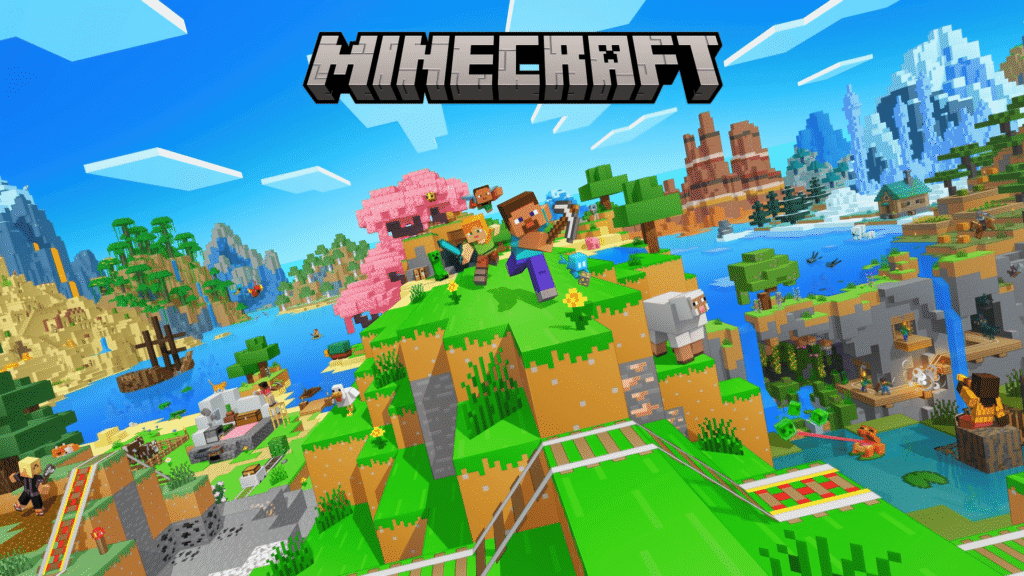
For more than a decade, Minecraft has stood as one of the most creative, community-driven games ever made. Millions of players around the world spend hours building castles, digging deep mines, and exploring endless biomes filled with adventure.
It’s not just a game—it’s a shared universe. And if you’ve never tried it, you might be wondering: is there a way to play Minecraft for free without breaking the rules?
The short answer is yes, but only if you do it the right way. Below, we’ll cover every legitimate and safe method to try Minecraft for free, along with some insider tips to make the most of your first adventure.
Why Minecraft Is Still the King of Sandbox Games
Minecraft isn’t just popular—it’s timeless. It keeps evolving while maintaining that same blocky charm that drew players in from the start.
The Game That Lets You Create Anything
From treehouses and roller coasters to full working computers built entirely out of Redstone, Minecraft gives you the tools to make almost anything you can imagine. You can focus on survival and crafting, or switch to Creative Mode to design your dream world with unlimited resources.
Every World Is Unique
Each time you start a new world, Minecraft generates a completely different map. No two adventures are ever the same. You might spawn in a peaceful meadow surrounded by mountains or in a desert filled with ancient temples. The randomness keeps exploration fresh and exciting every single time.
The Power of Community and Mods
Part of what makes Minecraft so lasting is its massive community. Players design mods that can change everything from how the game looks to how it plays. There are servers where you can fight dragons, play sports, build cities, or even reenact your favorite movies—all inside Minecraft’s engine.
The Right Way to Play Minecraft for Free
Here’s the good news: you don’t need to risk your computer or break any rules to enjoy Minecraft. Mojang and Microsoft offer several official ways to play without paying upfront. These are perfect for new players who want to see what the hype is all about.
1. The Official Minecraft Free Trial
The most straightforward way to play Minecraft for free is through the official trial version. It’s available on PC, Mac, and mobile devices, and it gives you full access to the game—but only for a limited time.
Once you download the trial from the official Minecraft website or your app store, you’ll get around 100 minutes of playtime. That’s enough to experience several in-game days of mining, crafting, and fending off creepers before nightfall.
Even though the time is limited, it’s a perfect way to test performance, learn the controls, and decide whether the full version is worth buying. And if you do decide to upgrade later, your progress carries over.
2. Minecraft Classic in Your Browser
If you want to play instantly—no downloads, no installs—try Minecraft Classic. This is a free, browser-based version of the original 2009 Minecraft release.
It’s a nostalgic trip back in time with old-school graphics, simpler controls, and a flat world. You can even invite friends by sharing a link, so up to nine people can join the same world online.
It doesn’t have survival mechanics or advanced features, but for quick creative building and a taste of history, it’s an easy way to experience the game’s roots.
3. Minecraft: Education Edition
For students and teachers, there’s a special version of the game called Minecraft: Education Edition. It’s designed for classrooms, but it plays almost exactly like the main game—with a few educational extras.
If you have a school email connected to Microsoft 365, you can usually download and play it for free. Even if you’re not a student, the Education Edition offers a demo world that anyone can explore.
What makes it unique is how it turns lessons into adventures. You can explore chemistry, learn basic coding, or take virtual field trips inside block-built worlds. It’s both fun and surprisingly informative.
4. Mobile and Console Trials
Mobile users often have access to short trial versions of Minecraft: Bedrock Edition through app stores. These are time-limited but let you explore worlds, mine resources, and test the game on your phone or tablet.
Console players, like those on Xbox or PlayStation, may also see free trial periods appear during seasonal promotions or events. Keep an eye on the store pages—they tend to return around holidays or big updates.
5. Free Community Servers
Even if you don’t own the game yet, some community servers allow limited guest access. These servers often let you spectate, build in designated zones, or join mini-games without a full account.
Just make sure any server you join is legitimate and safe. Stick to ones recommended by the official Minecraft community, and avoid sites that ask for logins or downloads—they’re almost always scams.
Safe and Legal Minecraft Alternatives
If you’ve already used up the trials and still aren’t ready to buy, there are a few Minecraft-inspired games that are completely free and 100% legal. They’re not knock‑offs—they’re community projects that offer similar creativity and exploration.
Minetest
An open-source sandbox game that looks and feels like Minecraft but is built by fans. It runs on almost any computer and includes mod support, multiplayer servers, and a creative mode.
Terasology
A more advanced, visually rich project inspired by Minecraft’s core mechanics. It combines block-building with more detailed environments and deep gameplay systems.
Creativerse
Available on Steam, this free-to-play game has the same crafting and exploration feel as Minecraft but adds its own twist with gadgets, blueprints, and technology-based progression.
These games aren’t replacements for Minecraft, but they’re excellent alternatives if you’re exploring sandbox games without spending money.
Why Buying Minecraft Is Still Worth It
After playing the free versions, you might find yourself hooked—and that’s when getting the full version becomes worthwhile.
When you purchase Minecraft, you unlock:
- Full access to survival and creative modes
- Regular updates and new biomes
- Access to multiplayer servers and Realms
- The ability to install mods, shaders, and custom skins safely
- A smoother, more secure experience free from bugs or missing features
Most importantly, buying the game supports the developers who keep it evolving. Every update—whether it’s new mobs, features, or world generation improvements—exists because players continue to support Minecraft officially.
Tips for Making the Most of Free Play
Even with limited time or features, you can still get a lot out of Minecraft’s free versions. Here are some ideas to make your sessions more fun and productive:
Learn the Basics Early
Spend your first sessions mastering movement, crafting, and tool usage. Learning how to build shelter and gather food will make you more confident when you move to survival mode.
Focus on Small Projects
Instead of trying to build a massive castle, work on something achievable—like a starter house or a small farm. This keeps your goals manageable while you’re still experimenting.
Use Creative Mode for Practice
Creative Mode in the free versions is great for learning how blocks interact. You can test building styles, Redstone mechanics, and even create mini-games.
Invite Friends
Playing alone is fun, but Minecraft truly shines with others. Whether you’re competing in mini-games or teaming up to build a world, multiplayer adds a whole new layer of excitement.
Keep Your Saves
If you decide to buy the game later, you can often import worlds from the trial versions. Back them up so you don’t lose your creations.
The Best Part: Minecraft Is Safer Than Ever
Over the years, Minecraft has added stronger security features, parental controls, and moderation tools. That means players—especially younger ones—can explore safely with family-friendly options enabled.
You can set up Realms, private multiplayer servers that only invited friends can join. It’s one of the safest ways to play together without random players interrupting your builds.