
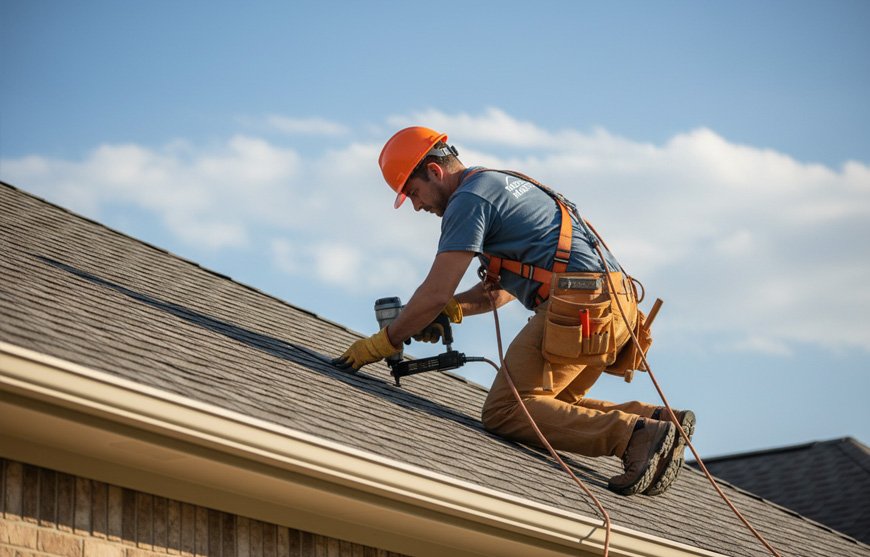
The first time OSHA showed up at my job site, I had three guys on a tear-off and a clipboard full of coffee-stained inspection forms. The compliance officer asked for our injury logs from the last year. I told him we only had four employees, so I figured none of that paperwork applied to us. He nodded, then asked if we had reported the hospitalization from three months ago. I had not. That mistake cost more than the software I had been too cheap to buy.
If you run a roofing company with five employees or fewer, you occupy a strange spot in OSHA’s world. You are small enough that routine recordkeeping requirements mostly do not apply to you, but you are still on the hook for severe incident reporting, safety inspections, and the same fall protection standards as the national crews. Roofing is one of the most dangerous trades in construction. A single bad fall or a hospitalization can put a five-person shop out of business if you are not prepared.
The good news is that you do not need enterprise software. You need a mobile tool that works on a job site, handles incident reporting when it matters, and keeps you organized without an office staff. This guide covers what five-employee roofing companies actually need, which tools fit that reality, and where most small contractors get themselves in trouble.
What OSHA Actually Requires From a Five-Person Roofing Crew
Understanding what you are exempt from is just as important as knowing what you must do.
The partial exemption: If you had ten or fewer employees during all of the last calendar year, you are partially exempt from OSHA’s routine injury and illness recordkeeping requirements. That means you do not have to maintain OSHA Form 300 (the injury log), Form 300A (the annual summary), or Form 301 (incident reports) for every scratch and sprain.
The non-negotiables: Regardless of your size, every employer in America must report work-related fatalities to OSHA within eight hours. You must also report any in-patient hospitalization, amputation, or loss of an eye within twenty-four hours. Roofing makes these events more likely than most trades. Falls from heights, nail gun injuries, and electrical contact are not theoretical risks. They are daily realities.
The inspection reality: OSHA does not need a complaint to visit a roofing site. Falls are a national emphasis program, meaning inspectors proactively target roofing work. When they arrive, they will ask for your safety program, training records, and any incident documentation. Even if you are exempt from Form 300 logs, having organized digital records of near-misses, safety meetings, and equipment inspections shows you run a serious business, not a fly-by-night operation.
The penalty picture: OSHA recently expanded penalty reductions for small employers. Businesses with up to twenty-five employees now qualify for a 70 percent penalty reduction if a violation occurs. There is also a 15 percent reduction for employers who fix hazards immediately upon identification. This is good news, but it only helps if you have a system in place to identify and correct hazards before an inspector writes the citation.
Why Paper Fails on a Roof
Roofing crews do not work in offices. They work in heat, wind, rain, and dust. Paper inspection forms get soaked, blown away, or left in the truck. Incident reports filled out hours after an event lose critical details. A supervisor who falls off a ladder is not going to walk back to the truck to find a clipboard.
Mobile safety software solves this by letting your crew document hazards, injuries, and inspections from their phones in real time. Photo evidence of a missing guardrail or a damaged harness is more credible than a handwritten note. Timestamped safety meetings prove you trained your crew before the incident, not after. Cloud storage means your records survive even if the job site trailer burns down or your office floods.
For a five-person crew, the software also creates professionalism. General contractors and homeowners increasingly ask for safety records before awarding jobs. A roofer who can show digital inspection logs, training certificates, and incident trends looks very different from one who shrugs and says, “We just try to be careful.”
What to Look for in Roofing Safety Software
Before comparing tools, know what features actually matter for a tiny crew.
Mobile-first design is non-negotiable. If the app does not work smoothly on a three-year-old Android phone with dirty fingers and spotty cell service, your crew will not use it.
Offline functionality matters because many job sites have weak or no data signal. The app should allow reporting and form completion offline, then sync when connection returns.
Photo and video attachment turns a near-miss report into evidence. A picture of a skylight without a cover is worth more than a paragraph describing it.
OSHA 300 log generation is useful even if you are exempt. Many small contractors voluntarily maintain logs to track trends, satisfy insurance auditors, or meet general contractor requirements. The software should generate the forms automatically if you choose to use them.
Training tracking keeps you honest about who has up-to-date fall protection certification. In roofing, expired training is a liability waiting to happen.
Affordable pricing means the tool should not cost more than your monthly nail gun budget. For a five-person crew, look for free tiers, per-user pricing under thirty dollars, or flat rates under one hundred dollars monthly.
The Best Software for Small Roofing Crews
SafetyCulture: The Free Starter
SafetyCulture offers a genuinely free plan for teams up to ten users, which covers most five-person roofing crews plus a supervisor or two. It is a mobile inspection and incident platform that lets you build custom safety checklists, conduct digital inspections, and report incidents from the field.
For roofing, you can create daily job site inspection forms that cover fall protection, ladder setup, debris management, and electrical hazards. Crew members complete the checklist on their phones, attach photos of any issues, and the system automatically notifies the owner or foreman. Incident reports flow into a central dashboard where you can track trends, like whether harness violations are increasing on certain types of jobs.
The platform also supports OSHA recordkeeping workflows. You can build custom forms that map to OSHA 300, 300A, and 301 requirements, and the system digitizes the data for easy retrieval. The paid plan starts at twenty-four dollars per user per month and adds advanced analytics and integrations.
The downside is that SafetyCulture is a generalist platform, not built specifically for construction. You will need to build your own roofing-specific checklists or adapt templates from their library. But for a free entry point with no user limit, it is the best place to start.
Ecesis: The OSHA Form Specialist
Ecesis is an incident management platform with a specific focus on OSHA compliance. It generates OSHA 300, 300A, and 301 forms automatically from incident data, which is valuable if you voluntarily maintain logs or if a general contractor demands them.
The mobile app allows field reporting of injuries, near misses, and unsafe conditions with photo attachments and geolocation. Automated notifications alert the right people via email or text when an incident occurs. The system includes root cause analysis tools, like Five Whys and fishbone diagrams, which help you understand why a fall happened rather than just documenting that it did.
For a five-person roofing company, Ecesis is probably overkill if you have zero incidents. But if you are dealing with workers compensation claims, insurance audits, or general contractor safety scorecards, the automated OSHA form generation saves hours of administrative work. Pricing is custom, so you will need to request a quote.
HCSS HeavyJob Safety: The Construction Native
HCSS builds software specifically for heavy construction and contractors. HeavyJob Safety is an incident reporting module that generates OSHA 300 logs in seconds and is designed for field-first data capture. Foremen can complete incident reports on tablets or smartphones directly from the job site, even in high-stress situations.
The platform captures personnel incidents, equipment damage, environmental spills, and general liability events. It supports GPS-tagged photos, voice-to-text witness statements, and attachments like medical releases or maintenance records. For roofing, this means you can document a damaged ladder, a fall incident, and a nearby power line contact all in the same system.
HCSS does not publish small-crew pricing, and it is likely geared toward larger contractors. However, if you are a five-person shop doing commercial work for general contractors who demand robust safety documentation, HeavyJob Safety provides the credibility you need. Request a demo to see if they offer a scaled-down package.
SiteDocs: The Paperless Safety System
SiteDocs is a construction-focused safety management platform that emphasizes eliminating paper. It offers digital forms, incident management, corrective actions, hazard management, and offline mobile access. For roofing crews working in rural areas with no cell service, the offline capability is critical.
The platform includes pre-built safety form templates and a workflow engine that automates notifications and escalations. If a crew member reports a missing guardrail, the system can automatically assign a corrective action to the foreman and track it to completion. This prevents the “I told the boss but nothing happened” problem that plagues small crews.
SiteDocs pricing is not publicly listed, but construction safety software in this category typically runs between fifty and one hundred fifty dollars per month for small teams. The value is highest if you are managing multiple job sites or if you need to produce safety documentation for commercial clients.
Safety Reports: The Safety Professional’s Tool
Safety Reports was built by a safety professional for remote worksites. The mobile apps work offline and cover inspections, training, job safety analyses, observations, incidents, and custom forms. It incorporates OSHA standards directly into the platform, which helps small contractors who do not have a safety manager on staff.
For roofing, the Job Safety Analysis module is particularly useful. You can break down each job task, identify hazards, and document controls before the crew starts work. The inspection app ensures daily checks happen consistently, and the incident module handles reporting when things go wrong.
Safety Reports offers tiered pricing, and the entry-level plan is affordable for small contractors. The focus on OSHA integration means you are not guessing whether your forms meet regulatory standards.
MyMomentum: The Small Business Specialist
MyMomentum from EHS Momentum is designed specifically for small businesses that need to manage safety without a dedicated safety department. It tracks training, certifications, and injury management from a single dashboard. The mobile app allows field reporting, and the system integrates with HR and workers compensation platforms.
For a five-person roofing crew, the training management feature is the standout. Roofing requires fall protection training, ladder safety, and equipment certification. MyMomentum tracks who is current and who is expiring, sending automated reminders before a certification lapses. This prevents the awkward moment when OSHA asks for training records and you realize your lead roofer’s fall protection card expired two months ago.
Quick Comparison for Small Roofing Crews
Table
| Software | Best For | Free Tier | Price | Mobile Offline | OSHA Forms |
|---|---|---|---|---|---|
| SafetyCulture | Free startup compliance | Yes, up to 10 users | $24/user/mo | Yes | Custom |
| Ecesis | OSHA form automation | No | Custom quote | Yes | Auto-generated |
| HCSS HeavyJob | Commercial GC work | No | Custom quote | Yes | Auto-generated |
| SiteDocs | Multi-site paperless | No | $50–$150/mo | Yes | Supported |
| Safety Reports | OSHA-integrated field safety | No | Tiered, affordable | Yes | Integrated |
| MyMomentum | Training and certification | No | Small business tier | Yes | Via incident module |
Common Mistakes Five-Person Roofing Shops Make
Assuming small size means no rules. Being exempt from routine OSHA 300 logs does not mean you are exempt from fall protection standards, hazard communication, or severe incident reporting. A single unreported hospitalization can trigger an investigation that reveals every other gap in your program.
Using generic business apps. A general task manager or note-taking app is not a safety system. You need timestamped incident reports, photo attachments, and audit trails that hold up in an investigation or court. Use software built for safety, not productivity.
Waiting for an incident to start tracking. The roofers who get in trouble are the ones who buy software after someone falls. Start documenting near-misses and daily inspections now. The data helps you prevent the incident that would have triggered the purchase.
Ignoring near-misses. A near-miss is a free lesson. If a bundle of shingles nearly slides off the roof but someone catches it, that is a reportable event. Track it, photograph the unsecured load, and fix the procedure. Near-miss reporting is how five-person crews stay five-person crews instead of becoming four-person crews.
Failing to document training. OSHA can cite you for lack of training documentation even if your crew knows what they are doing. If you hold a Monday morning safety talk, log it. Who attended, what was covered, date, time, and signature or photo evidence. Digital safety software makes this trivial.
Letting the owner be the only user. If only the owner has the app, incidents reported by crew members still travel through word of mouth. Every person on the roof should be able to report a hazard from their phone in under sixty seconds. If the app is too complicated for your crew to use without help, pick a simpler one.
Step-by-Step: Setting Up Your Safety System in One Day
You do not need a week-long implementation. You need one focused day and a decision to stop improvising.
Morning: Choose your tool and build your forms Pick one platform based on your budget. If you have zero dollars to spend, start with SafetyCulture’s free tier. If you need OSHA forms for a general contractor, look at Ecesis or Safety Reports. Create three core forms: daily job site inspection, incident/near-miss report, and weekly safety meeting log.
Midday: Load your training records Enter every crew member’s current certifications. Fall protection, ladder safety, first aid, OSHA ten-hour if anyone has it. Set expiration reminders for three months out so you have time to schedule renewals.
Afternoon: Train the crew Gather your five people. Show them how to open the app, start an inspection, take a photo, and submit a report. Have everyone practice reporting a fake near-miss. If anyone cannot complete the task in two minutes, simplify the form. The best safety software is the one your crew actually uses.
First job site: Run the first digital inspection The next morning, have the foreman complete the daily inspection on the app before the crew steps on the roof. Photo-document any hazards. Assign corrective actions immediately. This sets the tone that safety happens before work, not after an incident.
Weekly: Review the data Spend fifteen minutes every Friday looking at what was reported. Are ladder issues showing up on every job? Is one crew member generating more near-misses than others? Use the data to fix problems, not just to file reports.
Pro Tips for Roofing Safety Compliance
Use photo evidence for everything. A text description of a damaged harness is weak. A photo of the frayed strap with a timestamp is strong. Insurance adjusters, OSHA inspectors, and lawyers all respond to photos.
Report near-misses immediately. The app should be open on the roof. If a bundle slides and nobody gets hurt, the person who saw it should report it before lunch. Delayed reporting loses detail and signals that near-misses are not taken seriously.
Link incidents to weather and job type. Roofing is weather-dependent. Track whether incidents and near-misses happen more on steep-slope jobs, in high winds, or during tear-offs versus installs. This helps you adjust scheduling and crew assignments.
Keep a digital OSHA 300 log even if exempt. If you voluntarily maintain the log, you can spot trends. Three minor lacerations in two months might indicate a tool maintenance issue or a training gap. Without the log, you are just hoping things get better.
Back up your data weekly. Cloud-based apps are reliable, but export a PDF summary of incidents and inspections every Friday. Store it in a separate cloud folder. If your software vendor has an outage or you switch platforms, you still have your history.
Use the Spanish version if needed. If any crew member speaks Spanish as a primary language, ensure your safety forms and training materials are available in Spanish. OSHA requires training to be understandable, and language barriers are a common citation trigger.
FAQ: OSHA Reporting for Small Roofing Companies
Do I need to maintain OSHA 300 logs with only five employees? No. If you had ten or fewer employees during all of the last calendar year, you are partially exempt from routine recordkeeping. However, you must still report fatalities within eight hours and hospitalizations, amputations, or eye losses within twenty-four hours.
Should I still use safety software if I am exempt from logs? Yes. Exemption from paperwork does not mean exemption from safety standards. Roofing remains one of the most dangerous trades. Software helps you prevent incidents, document training, and satisfy general contractors and insurers.
What happens if I do not report a severe injury? OSHA can cite you for failure to report, which carries separate penalties beyond the underlying violation. The reporting requirement applies to every employer regardless of size.
Can I just use a spreadsheet? You can, but spreadsheets lack photo capture, mobile access, automatic timestamps, and audit trails. For a five-person crew, a dedicated safety app is more reliable and takes less administrative time than maintaining spreadsheets.
Do I need to post OSHA Form 300A? Only if you are required to keep OSHA injury and illness records. With five employees, you are exempt, so you do not need to post the 300A. However, some general contractors may require it as a condition of work.
What is the cheapest way to stay compliant? SafetyCulture’s free tier supports up to ten users and includes inspection checklists, incident reporting, and photo documentation. For a five-person roofing crew, this covers the core needs at zero cost.
How quickly do I need to report an injury to OSHA? Fatalities must be reported within eight hours. In-patient hospitalizations, amputations, and losses of an eye must be reported within twenty-four hours. These deadlines are absolute.
Does OSHA target small roofing companies for inspections? OSHA operates a national emphasis program on falls, which includes roofing. Inspectors can arrive unannounced at any roofing job site, regardless of company size. Having digital safety records ready shows you are organized and serious.
Can my crew report incidents without me there? Yes. The best safety apps allow any crew member to submit a report from their phone. The report automatically notifies the owner or supervisor. This ensures hazards get documented even when you are on another job site.
Conclusion
A five-person roofing company does not need a safety director. It needs a safety habit. The right software turns that habit into a system that protects your crew, satisfies inspectors, and wins commercial bids.
You are exempt from the heavy paperwork, but you are not exempt from the danger. Falls kill roofers every week, and most of them work for small companies. The contractors who survive and grow are the ones who treat safety as seriously as they treat nail guns and shingles.
Start with SafetyCulture if you need free, simple compliance. Move to Ecesis or Safety Reports if you need OSHA form automation for general contractors. Use MyMomentum if training tracking is your biggest gap. But start today. The inspection you log this week might prevent the hospitalization you would have to report next week.