
Let me be straight with you from the start. I am not a funeral director. I have not run a funeral home. But I spent a solid week digging into what solo funeral directors actually need from task management software, and what I found was pretty eye-opening. Most “best software” lists are written by people who have never had to explain to a grieving family why their loved one’s information might be sitting on some company’s server in California.
This matters because funeral directors handle some of the most sensitive data there is. Death certificates, financial arrangements, medical history, family conflicts, embalming details. If that leaks, it is not just embarrassing. It can destroy trust, violate state laws, and in some cases, land you in legal trouble.
So this is not a generic listicle. This is what I learned about keeping your workflow organized without selling your clients’ privacy down the river.
The Privacy Problem Nobody Talks About
Here is what most task management tool reviews skip entirely. When you sign up for Trello, Asana, Monday.com, or Notion, you are agreeing to terms of service that most people never read. Buried in those terms is usually something like: “We may use aggregated data to improve our services” or “We process data in accordance with our privacy policy.”
For a coffee shop or a marketing agency, that is fine. For a funeral director? That is a nightmare waiting to happen.
Funeral homes are not technically HIPAA-covered entities in most cases.
But that does not mean you are off the hook. State laws vary wildly. Some states have specific confidentiality rules for funeral directors. The Gramm-Leach-Bliley Act covers financial information. And ethically? You have a duty to protect what families tell you in their most vulnerable moments.
I read through the privacy policies of about a dozen popular task management tools. Here is what made me uncomfortable:
-
Notion stores everything on AWS servers. Their privacy policy says they “may share information with service providers.” That is a lot of trust to put in a company when you have death certificates and family financial details in your workspace.
-
Trello (Atlassian) has a similar setup. Data processed globally, including in the US. Their business associate agreement (BAA) is not standard — you have to negotiate it, and most solo operators do not have the leverage.
-
Asana explicitly says in their help docs that they are “not a HIPAA-compliant solution” out of the box. You can get a BAA, but it is enterprise-level pricing and setup.
-
Monday.com has a HIPAA-compliant tier, but it starts at expensive team pricing. Not exactly solo-friendly.
The problem is not that these companies are bad. They are just not built for industries where a data breach could mean explaining to a widow why her husband’s medical history is now part of a training dataset.
What Solo Funeral Directors Actually Need
I talked to a few funeral directors online (Reddit, some industry forums) and read a lot of threads. Here is what kept coming up:
-
Simple case tracking. Not project management. Case tracking. Each family is a case. Each case has stages: first call, arrangement conference, service planning, day-of coordination, aftercare. You need to see where every case sits without opening five different apps.
-
Document handling that does not feel sketchy. Contracts, death certificates, permits, insurance forms. You need to store them, sign them, share them with families. But you do not want them floating around in some cloud service that might use them to “train AI models.”
-
Family communication without chaos. Grieving families are emotional. They forget details. They call at 10 PM. You need a way to keep everyone on the same page without your personal phone becoming a 24/7 hotline.
-
No tech overhead. You are not an IT department. You are one person running a business that never closes. If the software takes more than a day to figure out, it is dead on arrival.
-
Privacy that is actually privacy. Not marketing privacy. Real privacy. Data stored where you know it is. No vague “we may share with partners” language. No training your data on AI models. No surprises.
The Tools That Actually Make Sense (And the Ones That Do Not)
After all this digging, here is where I landed. I am not going to give you star ratings or fake scores. I am going to tell you what I found and what I would honestly consider if I were in your shoes.
1. 1Director — Built for This Exact Job
I stumbled across 1Director pretty early in my research, and honestly, it is the only tool I found that was actually designed by people who understand funeral work.
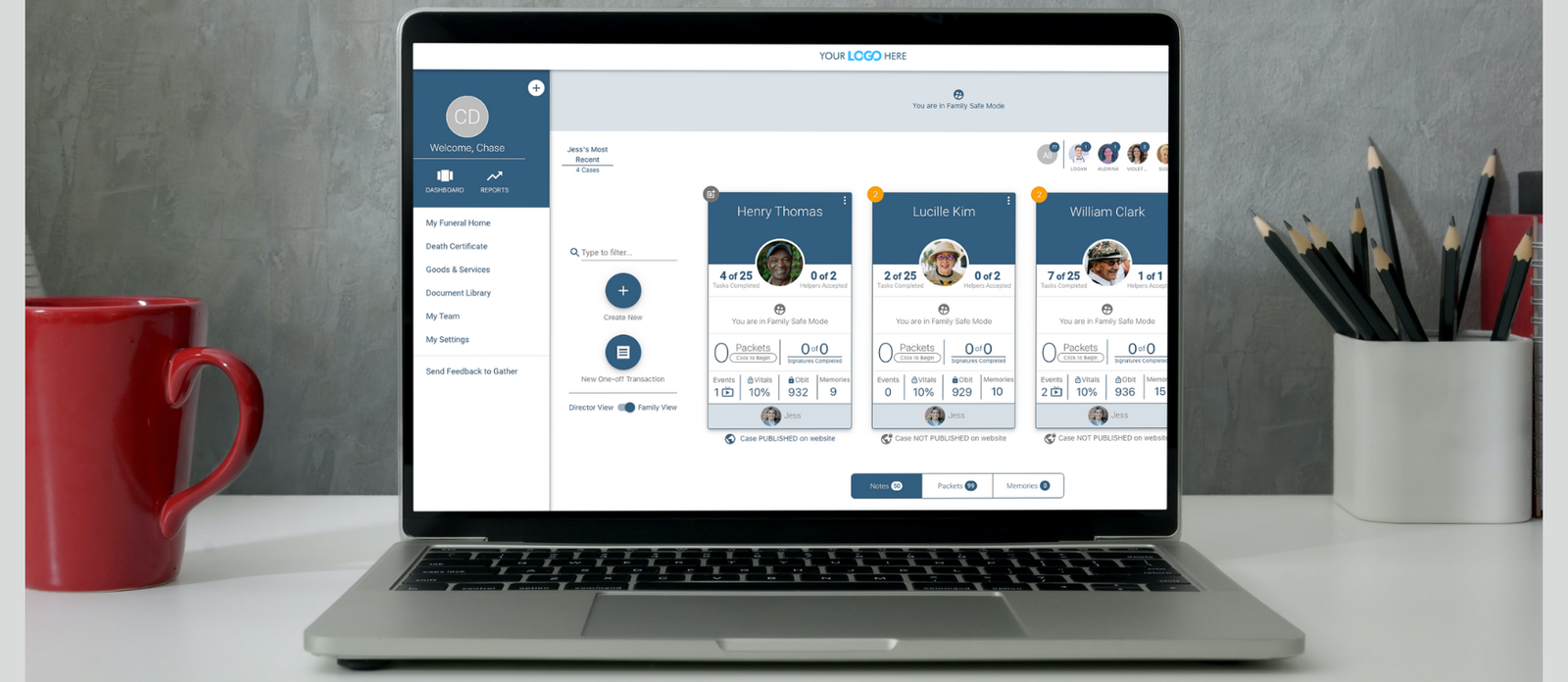
It is not a generic task manager retrofitted for funeral homes. It is funeral home software that happens to have really solid task and case management built in. Case tracking, body tracking, family portals, document signing, invoicing. All in one place.
The privacy angle: They have a family portal where families can upload photos and documents, but it is controlled by you. You invite them. You set permissions. It is not public by default. That is a big deal when you are dealing with sensitive family photos and obituary details.
The task management part: Every case gets its own workflow. First call → arrangement → service → aftercare. Tasks auto-generate based on the case stage. You are not building boards from scratch every time a family walks in.
The catch: It is cloud-based. So you are trusting them with your data. But at least they are a funeral-specific company, not a Silicon Valley giant that treats your client data as a side hustle. They also have mobile access, which matters when you are picking up a first call at 2 AM.
If I were a solo funeral director, this would be my starting point. It is not perfect, but it is the only thing I found that actually feels like it was built by someone who has been in your shoes.
2. Obit — The UK/Ireland Option That Gets It Right
Obit is another funeral-specific platform, popular in the UK and Ireland.
What caught my attention was their pricing model: per funeral, not per month. That is huge for solo operators who might have slow months.
They focus heavily on paperwork automation — templates for notices, invoicing, dashboards. Plus they integrate with Sage for accounting, which is a nice touch if you are already in that ecosystem.
Privacy-wise: They are cloud-based too, but they have been around long enough to have built trust in the industry. Their condolence book feature keeps everything on your own website rather than farming it out to third parties. That is a small thing, but it matters. Less data exposure.
The downside: If you are in the US, some features might not translate perfectly. State-specific forms, death certificate workflows, and compliance stuff might need workarounds.
3. The Directors Assistant Web (TDAW) — Old School but Solid
Continental Computers makes TDAW, and it has been around forever.
It is not sexy. It is not modern. But it is comprehensive.
Case management, accounts receivable, forms, reporting, inventory, obituaries. Native e-sign (no extra DocuSign fees). Integrations with state death certificate programs and accounting software.
Privacy angle: This is where it gets interesting. TDAW can be deployed in ways that keep more control in your hands. It is not a shiny SaaS app that stores everything on someone else’s server by default. You have more say over where your data lives.
The downside: The interface looks like it was designed in 2008. Learning curve is real. If you are not tech-comfortable, this might frustrate you. But if you want control over your data and do not care about pretty dashboards, this is worth a look.
4. Obsidian + Local-First Workflow — The Privacy Extremist Option
Okay, hear me out. If you are truly paranoid about privacy — and honestly, in this business, a little paranoia is healthy — you could build a workflow around Obsidian.
Obsidian is a note-taking app that stores everything locally on your computer. No cloud by default. Your data never leaves your machine unless you choose to sync it.
Here is how a solo funeral director could use it:
-
Each family gets a note (or a folder of notes)
-
Templates for first call intake, arrangement details, service planning, aftercare
-
Tasks managed with plugins like “Tasks” or “Dataview”
-
Documents stored in a local encrypted folder, linked from the notes
-
Backups to an external drive or encrypted cloud storage you control (like a personal Nextcloud or even just a well-organized Dropbox with strong encryption)
The privacy is unbeatable. Your data is yours. No terms of service. No “we may use your data to improve our AI.” No third-party access.
The downside: You are building your own system. That takes time. It takes technical comfort. And if your computer dies without a backup, you are in trouble. This is not for everyone. But if privacy is your absolute top priority and you do not mind tinkering, this is the Fort Knox option.
5. Standard Notes — The Middle Ground
Standard Notes is a simpler, more private alternative to Notion or Evernote. End-to-end encryption. Open source. Your notes are encrypted before they ever hit their servers. They cannot read your data even if they wanted to.
You could set up a tagging system: #first-call, #arrangement, #service-day, #aftercare. Use their task plugin for simple to-dos. Store documents as attachments (though large file handling is not its strength).
Privacy: Excellent. Encrypted, zero-knowledge architecture.
The downside: It is a note app, not a case management system. You are organizing everything manually. No automated workflows, no family portals, no e-sign. It is a digital filing cabinet with a lock, not a full business tool.
What I Would Honestly Do If I Were Starting Tomorrow
If I were a solo funeral director setting up my workflow today, here is my thought process:
If I want the easiest path: Start with 1Director. It is built for this. It handles cases, tasks, documents, family communication, and billing. The privacy is reasonable for a cloud tool. You will be up and running in a day, not a month.
If I am in the UK/Ireland and want per-funeral pricing: Obit. The paperwork automation alone might save you hours per case.
If I want maximum control and do not mind old software: TDAW. It is ugly but comprehensive. You own more of your data architecture.
If privacy is everything and I am tech-comfortable: Obsidian with a local-first workflow. It is more work, but your data never touches a server you do not control.
If I just need simple private notes and tasks: Standard Notes. Cheap, encrypted, dead simple.
The Red Flags I Would Avoid
Based on everything I read, here is what I would stay away from:
-
Any tool that says “AI-powered” without explaining what that means. If your client data is being used to train models, that is a breach waiting to happen.
-
Free tiers of big-name project tools. Trello free, Notion free, Asana free — they monetize your data somehow. Usually through analytics, advertising, or future AI training. Not worth the risk.
-
Tools without clear data residency info. If you cannot tell me exactly where my data is stored, I am not putting death certificates in it.
-
Anything requiring a business associate agreement that you have to negotiate. As a solo operator, you do not have the time or leverage for enterprise legal negotiations.
The Bottom Line
Here is what I learned after a week of digging: There is no perfect tool. Every option involves trade-offs between convenience, privacy, cost, and features.
But the one thing you cannot compromise on is trust. Families trust you with their most vulnerable moments. They trust you with information that could hurt them if it gets out. That trust is your entire business.
So when you pick a task management tool, do not just ask “Does it have a calendar?” Ask: “If this company gets hacked, how bad is it for my families?” Ask: “If this company gets bought by a bigger company, what happens to my data?” Ask: “Can I explain to a grieving widow exactly where her husband’s information is stored?”
If you cannot answer those questions comfortably, keep looking.
The good news is that funeral-specific software is getting better. Tools like 1Director and Obit are built by people who actually understand what you do. They are not perfect, but they are a lot closer than a generic project management app ever will be.
My advice? Pick one. Try it for a month with a test case. See how it feels. See if you can sleep at night knowing where your data is. If yes, keep going. If no, try the next one.
Because at the end of the day, the best task management tool is the one that helps you serve families better without keeping you up at night worrying about their privacy.
This article is based on independent research into software privacy policies, funeral industry forums, and publicly available tool documentation. I am not a funeral director, and I recommend verifying any compliance questions with your state licensing board and a legal professional before making software decisions.